Introduction
Video super-resolution (VSR) is a cool AI technique that takes low-quality videos—like blurry smartphone clips or compressed streams—and turns them into sharp, high-resolution versions. It’s super useful for things like improving old family videos, enhancing live streams, or fixing footage from social media. Recently, diffusion models (a type of AI that starts with noisy images and gradually cleans them up) have made VSR even better, but they’ve been slow, resource-hungry, and bad at handling super-long or ultra-high-res videos.
Enter FlashVSR, a new AI model from researchers in China. It’s the first diffusion-based VSR that’s fast enough for real-time use, running at about 17 frames per second on high-res videos (like 768x1408) using just one powerful GPU. That’s up to 12 times faster than similar models! It also works in a “streaming” way, meaning it processes videos as they come in, without big delays. If you’re new to AI, think of FlashVSR as a smart video enhancer that makes your fuzzy clips look professional—without waiting hours. This article breaks it down simply, explains how it works, and shows how it can upgrade your videos.
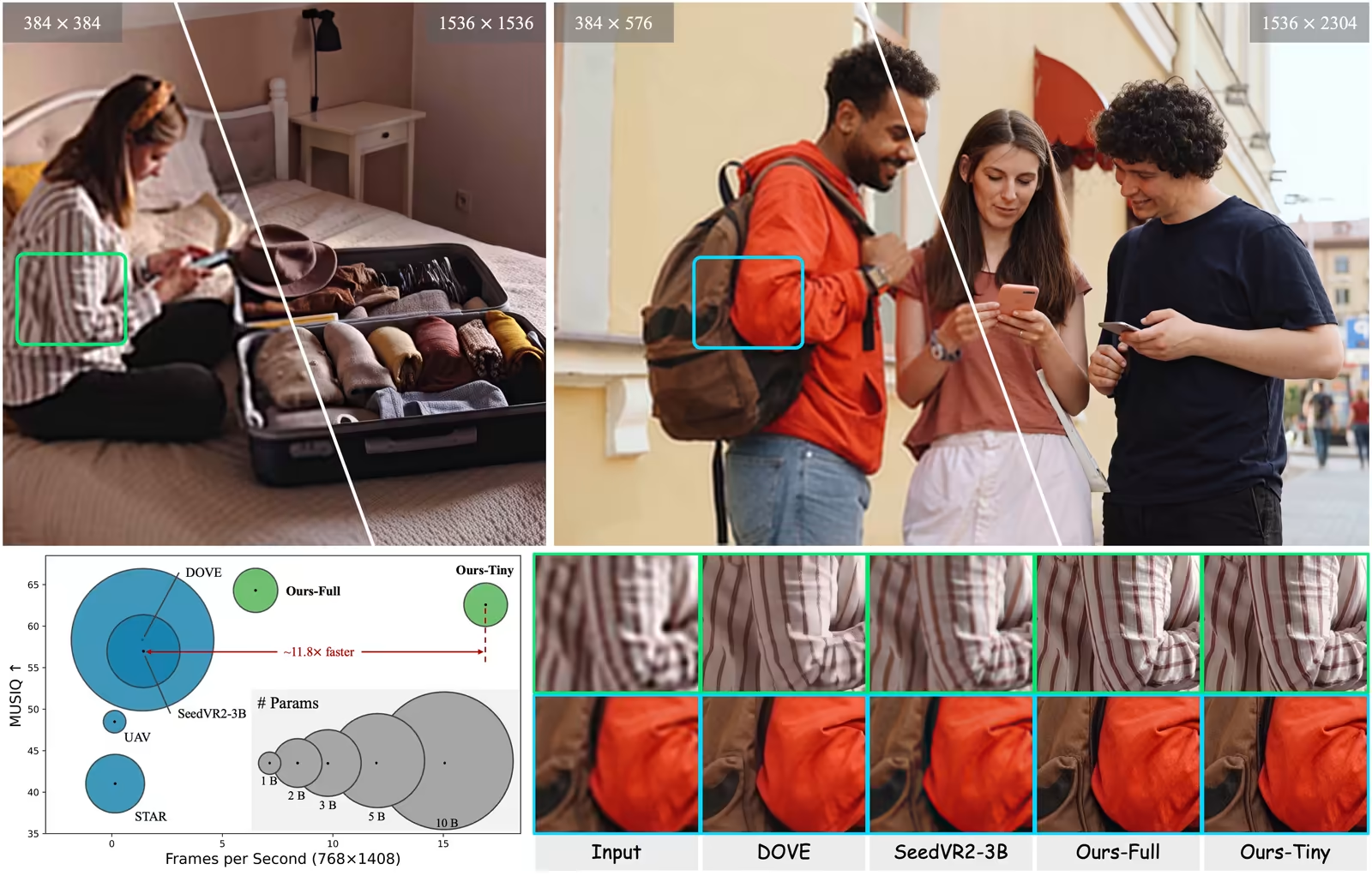
What is FlashVSR? Overview and Benefits
FlashVSR is an AI system designed to upscale videos quickly and efficiently. “Upscale” means increasing the resolution (like from 480p to 4K) while adding details to make it look natural and clear. It’s built on diffusion models, which work by adding noise to an image and then removing it step by step to create something better. But FlashVSR squeezes this process into one quick step, making it practical for everyday use.
Here are the key benefits, explained simply:
- Speed Demon: Processes videos at 17 FPS for 768x1408 resolution on a single A100 GPU. That’s near real-time—great for live editing or streaming.
- Streaming Magic: Handles long videos without chopping them into chunks, reducing delay to just 8 frames (about half a second). Older methods might wait 80+ frames!
- Scales to Ultra-High Res: Works reliably up to 1440p or higher, avoiding common issues like blurry or repeating patterns in big videos.
- Big Training Data: Uses a new dataset called VSR-120K with 120,000 videos (each over 350 frames long) and 180,000 high-quality images. This helps the AI learn from diverse, real-world examples.
- Efficient Design: Cuts down on computing power by focusing only on important parts of the video, saving memory and time.
For AI beginners, FlashVSR is like a turbocharged photo editor but for videos. It fixes issues from poor cameras or compression, adding sharpness and details that weren’t there before. The code, models, and dataset are available on GitHub, so you can try it yourself.
How FlashVSR Works: The 3-Stage Training Process
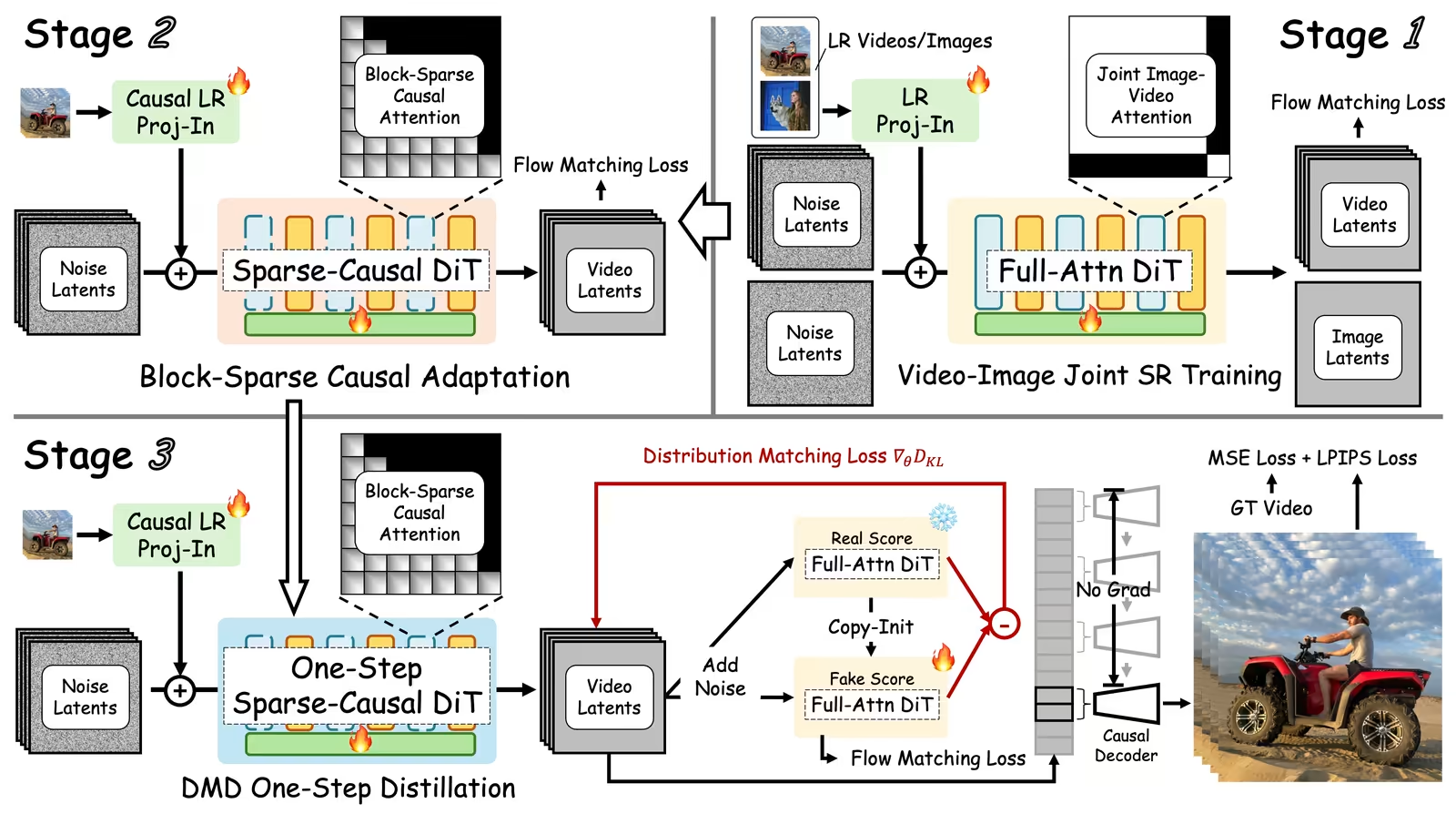
Training an AI like FlashVSR is like teaching a kid to ride a bike—you start with basics and build up. The team used a smart “distillation” pipeline with three stages to make it fast and accurate. Distillation means taking a big, slow teacher model and shrinking it into a quick student version without losing quality.
-
Stage 1: Joint Image-Video Super-Resolution Training
They start with a pre-trained diffusion model (called Wan 2.1) and fine-tune it for VSR. Images are treated as “1-frame videos” so everything uses the same 3D attention system (attention is how AI focuses on important parts). Low-res inputs get projected into features, and the model learns to output high-res versions using “flow matching” (a way to match noisy data to clean results). This stage builds a strong base by combining image sharpness with video motion. -
Stage 2: Block-Sparse Causal Attention Adaptation
To make it streaming-friendly, they switch to “sparse causal attention.” Causal means the AI only looks at past frames (like reading a book page by page). Sparse means it skips unnecessary calculations—first, it makes a rough map of important areas, then focuses only on the top ones. This cuts compute by 80-90% without hurting quality. It’s like skimming a book for key points instead of reading every word. -
Stage 3: One-Step Distribution-Matching Distillation
The final step compresses everything into one pass. Using “distribution matching,” the student model learns to mimic the teacher’s output in a single step. It takes low-res frames and noise as input, predicts the high-res latent (compressed version), and refines it. Losses (error measures) include matching distributions, flow matching, and pixel accuracy. Unlike video generation AIs that need past clean frames for motion, VSR relies on low-res inputs, so training is parallel and efficient—no gaps between training and real use.
Extra tricks: “Locality-constrained sparse attention” limits focus to nearby areas in high-res videos, preventing weird repeats or blurs from position mismatches. The “tiny conditional decoder” speeds up the final step by using low-res frames as hints, making decoding 7x faster.
In simple terms, FlashVSR learns like this: Build knowledge (Stage 1), optimize for speed and streaming (Stage 2), and compress into one quick action (Stage 3). This makes it handle real-world videos smoothly.
Upscaling and Improving Videos with FlashVSR
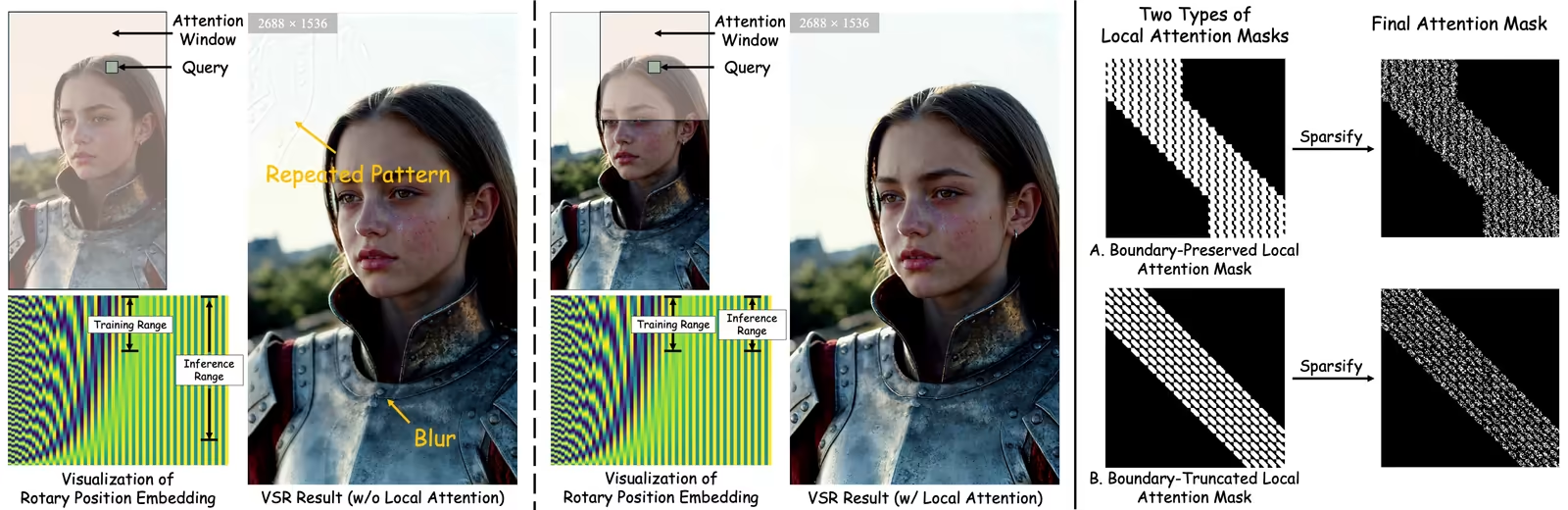
So, how does FlashVSR actually upscale a video? Let’s break it down step by step, like a recipe.
-
Step 1: Input the Low-Res Video
Feed in your blurry, low-res video. FlashVSR works on frames one by one in streaming mode. -
Step 2: Add Noise and Convert to Latent Space
It adds noise (random fuzz) to the frames and compresses them into “latents”—a compact AI-friendly format. This is where diffusion magic starts. -
Step 3: Sparse Attention for Smart Processing
Using block-sparse causal attention, the AI focuses on key spatial and temporal parts. It looks back at past frames via a cache (memory buffer) for consistency, but skips redundant stuff to stay fast. -
Step 4: One-Step Denoising
In a single pass, it removes noise and predicts the high-res latent. The model “imagines” missing details based on training, making textures sharper and structures clearer. -
Step 5: Decode to High-Res Output
The tiny conditional decoder takes the latent and low-res frame as inputs, quickly reconstructing the final high-res video. This adds fine details without heavy compute.
Improvements: FlashVSR fixes blurriness, reduces noise, and enhances details like faces or backgrounds. It keeps videos temporally consistent—no flickering in motion. For example, a compressed 480p clip becomes a crisp 1080p or higher, looking natural. Experiments show it beats others in metrics like PSNR (sharpness) and MUSIQ (aesthetic quality). On datasets like REDS, it scores higher in perceptual tests, meaning humans prefer its results.
If you’re an AI newbie, imagine FlashVSR as a video filter on steroids. It doesn’t just stretch pixels; it intelligently fills in gaps using learned patterns from millions of examples.
Comparison with Other Models
FlashVSR stands out, but how does it stack up against others? Here’s a quick look at key competitors. All are VSR models, but FlashVSR wins on speed and scalability.
| Model | Advantages | Disadvantages |
|---|---|---|
| FlashVSR | Real-time (17 FPS), streaming, low latency, handles ultra-high res, 12x faster | Needs a good GPU |
| DOVE | One-step, great perceptual quality | Slow (1.4 FPS), high memory (25 GB) |
| SeedVR2-3B | Strong diffusion-based detail recovery | 1.4 FPS, massive memory (53 GB), chunk-based delays |
| STAR | Multi-step for fine control | Very slow (0.15 FPS), needs 15 steps |
| Upscale-A-Video | Uses optical flow for motion handling | Slowest (0.12 FPS), 30 steps, struggles with high res |
| RealViFormer | Non-diffusion, faster in some cases | Lower quality, depends on training data |
From experiments, FlashVSR tops charts in quality metrics like DOVER (overall video score) and uses less memory (11 GB vs. 53 GB for SeedVR2). User studies show people prefer its outputs for fidelity and quality. If speed matters, FlashVSR is the champ.
Conclusion and Recommendations
FlashVSR is a game-changer for AI video upscaling—fast, scalable, and easy to use even for beginners. By clever training stages, sparse attention, and a tiny decoder, it turns low-quality videos into high-res masterpieces in real time. Whether you’re editing smartphone clips or streaming content, it saves time and boosts quality without fancy setups.
Recommendation: If you’re new to AI, start by downloading the code from FLASHVSR: Towards Real-Time Diffusion-Based Streaming Video Super-Resolution. Test it on your videos—it’s free and open-source. For pros, integrate it into tools like video editors. What’s your take? Share in the comments how AI like this could change your workflow!