SeedVR2 v2.5 represents a significant advancement in the integration of ByteDance’s AI-based video restoration model with ComfyUI. This update delivers substantial improvements in speed, memory efficiency, quality, and usability, particularly enabling operation on lower-end GPUs. Previous versions struggled with memory shortages and processing instability, but v2.5 adopts a modular design, allowing the 7 billion parameter model to run on GPUs with just 8GB VRAM. This makes professional-grade video upscaling accessible on consumer hardware, benefiting fields like VFX and content creation.
Video upscaling involves converting low-resolution footage to higher resolutions while adding details. SeedVR2 stands out with its diffusion model foundation, performing restoration in a single step rather than multiple iterations, which enhances efficiency over traditional methods. The v2.5 release incorporates community feedback, introducing block swapping and torch.compile integration to reduce processing times while preserving quality. For instance, in long video processing, a streaming architecture stabilizes memory usage, preventing VRAM accumulation. This allows users to build flexible workflows that transcend hardware limitations.
Moreover, enhanced RGBA support ensures natural handling of transparency channels, with edge-guided upscaling for cleaner results. Resolution flexibility has improved, supporting any resolution divisible by 2. Overall, SeedVR2 v2.5 symbolizes the democratization of AI tools, making them approachable for professionals and hobbyists alike. The following sections delve into its details.
 Overview
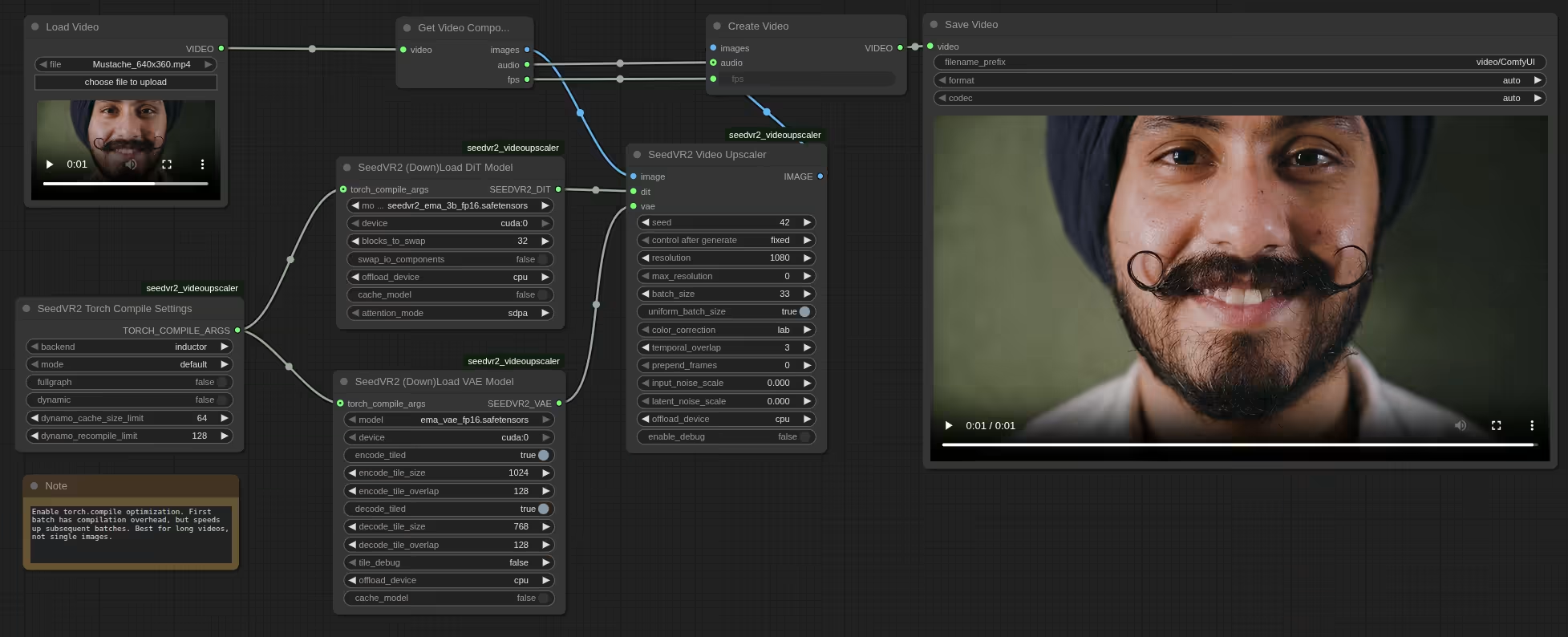
SeedVR2 is a diffusion transformer-based video restoration model proposed by ByteDance’s research team. It aims to handle videos of arbitrary resolutions and lengths using a generative pipeline. In v2.5, the ComfyUI integration has been completely redesigned with a modular architecture. This separates the loading of the DiT (Diffusion Transformer) model and VAE (Variational Autoencoder), enabling users to adjust settings individually.
The core of this version lies in optimization for low-VRAM environments. For example, the 7 billion parameter model can now run on 8GB GPUs through GGUF quantization, reducing memory consumption significantly. The processing flow is divided into four phases—encoding, upscaling, decoding, and post-processing—with efficient resource release in each.
Quality enhancements include LAB color matching as the default, supported by HSV and wavelet adaptive methods. Temporal consistency is maintained via Hann window blending for smooth batch transitions. The CLI (command-line interface) has also been strengthened, adding batch processing and multi-GPU support. These changes, driven by community contributions, evolve SeedVR2 into a more practical tool.
 Installation Guide
Installing SeedVR2 v2.5 is straightforward via the ComfyUI Manager. Search for “SeedVR2” in the custom nodes manager and select the AInVFX version, which boasts the highest star count. Ensure it’s version 2.5 or higher. After installation, restart ComfyUI and monitor the shell for errors. Flash Attention and Triton are optional but boost inference speed.
For manual installation, visit the official GitHub repository and follow the documentation. Install dependencies and resolve any environment conflicts. Model files download automatically from Hugging Face, but manual downloads are available from AInVFX, numz, and cmeka repositories. Place them in ComfyUI’s models/SeedVR2 folder.
To use a custom directory, edit extra_model_paths.yaml to specify the path. Upon ComfyUI restart, new models are recognized. Download interruption support resumes partial downloads and verifies file integrity. This ensures a stable setup, allowing users to load template workflows for immediate testing.
 Model Variations
SeedVR2 models come in 3 billion parameter (3B) and 7 billion parameter (7B) variants, each with quantization options. The 3B model is lightweight, ideal for low-VRAM setups and quick processing. The 7B model excels in detailed restoration, with a sharp variant enhancing edge clarity.
Quantization options include FP8, FP16, and GGUF (4-bit Q4_K_M, 8-bit Q8_0). GGUF is highly memory-efficient, enabling 7B models on 8GB VRAM. Block counts are 36 for 3B and 66 for 7B, facilitating block swapping for optimization.
Here’s a comparison table:
| Model | Parameter Count | Quantization Options | Minimum VRAM | Features | Weaknesses |
|---|---|---|---|---|---|
| 3B | 3 billion | FP8, FP16, GGUF | 5GB+ | Fast processing, low memory | Less detailed than 7B |
| 7B | 7 billion | FP8, FP16, GGUF | 8GB+ (with GGUF) | High quality, sharp variant | Higher memory load for large models |
| 7B Sharp | 7 billion | FP16 | 8GB+ | Edge enhancement | May introduce more noise |
Model selection depends on hardware. For consumer GPUs, start with GGUF-quantized 3B; for quality, opt for 7B. Verified from official Hugging Face repositories, supporting arbitrary resolutions divisible by 2.
-
Specs:
- 3B: 36 blocks, suited for mobile devices.
- 7B: 66 blocks, superior for detail addition.
- GGUF: 4/8-bit quantization reduces VRAM to one-third.
-
 Pros:
Pros:- High flexibility with diverse quantizations.
- Sharp variant improves visual impact.
-
 Cons:
Cons:- 7B may cause VRAM shortages at high resolutions.
- Quantization could lead to minor quality degradation.
 Performance Optimization
The standout evolution in v2.5 is performance tuning. Torch.compile support yields 20-40% speedup for DiT and 15-25% for VAE by compiling the entire graph for CUDA optimization. However, initial compilation takes 2-5 minutes, making it suitable for long videos or batch jobs. For short clips, disable it.
Block swapping divides models into chunks, offloading to CPU. For 7B, swapping 36 blocks keeps peak VRAM under 2GB. Installing Flash Attention accelerates inference by 10%. Tiling is enhanced, with independent encode/decode controls.
Model caching shares models across upscalers, updating settings automatically to eliminate reload times. In CLI, multi-GPU distributes workloads with temporal overlap blending.
These optimizations enable 4K upscaling on consumer hardware. For example, a batch size of 5 works on most GPUs, shortening times.
-
Features:
- Torch.compile: Adjustable modes (default to max-autotune).
- Block swapping: Adaptive memory clearing (5% threshold).
-
Pros:
- Significant time savings for long videos.
- Scalable with multi-GPU.
-
Cons:
- Compilation overhead unsuitable for short tasks.
- Speed drop without Flash Attention.
 Memory Management
Memory improvements are central to v2.5. A streaming architecture prevents VRAM buildup by offloading batches to CPU RAM. Independent offload devices for DiT, VAE, and tensors allow CPU/GPU/none selections.
The four-phase pipeline releases resources per stage. Peak VRAM tracking monitors usage by phase. GGUF quantization cuts VRAM, running 7B on 8GB.
For long videos, enabling offload fixes VRAM at around 11GB, regardless of length. CPU RAM must suffice for final output, but streaming avoids duplication.
-
Features:
- Offloading: Independent for DiT/VAE/tensors.
- Peak tracking: Detailed logs.
-
Pros:
- Stable processing for extended videos.
- Low-VRAM GPU compatibility.
-
Cons:
- CPU RAM shortages limit scope.
- Speed reduction with offloading.
 Quality Enhancements
On quality, LAB color correction is default for perceptual accuracy, with HSV saturation matching and wavelet adaptive options. Deterministic generation ensures seed-based reproducibility.
Temporal consistency uses Hann window blending for seamless batch transitions. RGBA support handles alpha channels with edge-guided upscaling. Resolution padding is lossless.
-
Features:
- Color correction: LAB, HSV, wavelet.
- Blending: Hann window.
-
Pros:
- Natural color reproduction.
- Transparency support.
-
Cons:
- Alpha processing in progress.
- Minor noise at high resolutions.
 CLI Features
The CLI excels in batch processing. It handles entire folders, caching models for efficiency. Output formats auto-detect (MP4/PNG). Multi-GPU distributes work with overlap blending.
Parameters align with ComfyUI. Example: Resolution 1080, max 1920, batch size 21, block swap 16.
-
Features:
- Batch processing: Mixed images/videos.
- Caching: DiT/VAE.
-
Pros:
- Ideal for production pipelines.
- Comprehensive help display.
-
Cons:
- Learning curve for non-ComfyUI users.
- Further error handling needed.
 Usage Examples
Start with single-image upscaling in ComfyUI: Load a template, set DiT to 7B FP16, enable VAE tiling. Fix the seed and adjust resolution.
For videos, set batch size to 4n+1 (e.g., 5), offload to CPU. In CLI, process folders: python inference_cli.py media_folder/ --output processed/ etc.
This upscales commercial assets like Pixabay images effectively. Use debug mode to monitor memory and optimize.
SeedVR2 v2.5 paves the way for AI video restoration’s future. High-quality processing on consumer hardware boosts VFX efficiency. For balanced use, begin with 3B and upgrade to 7B as needed. Broadly, such tools lower creative barriers, fostering innovative content.