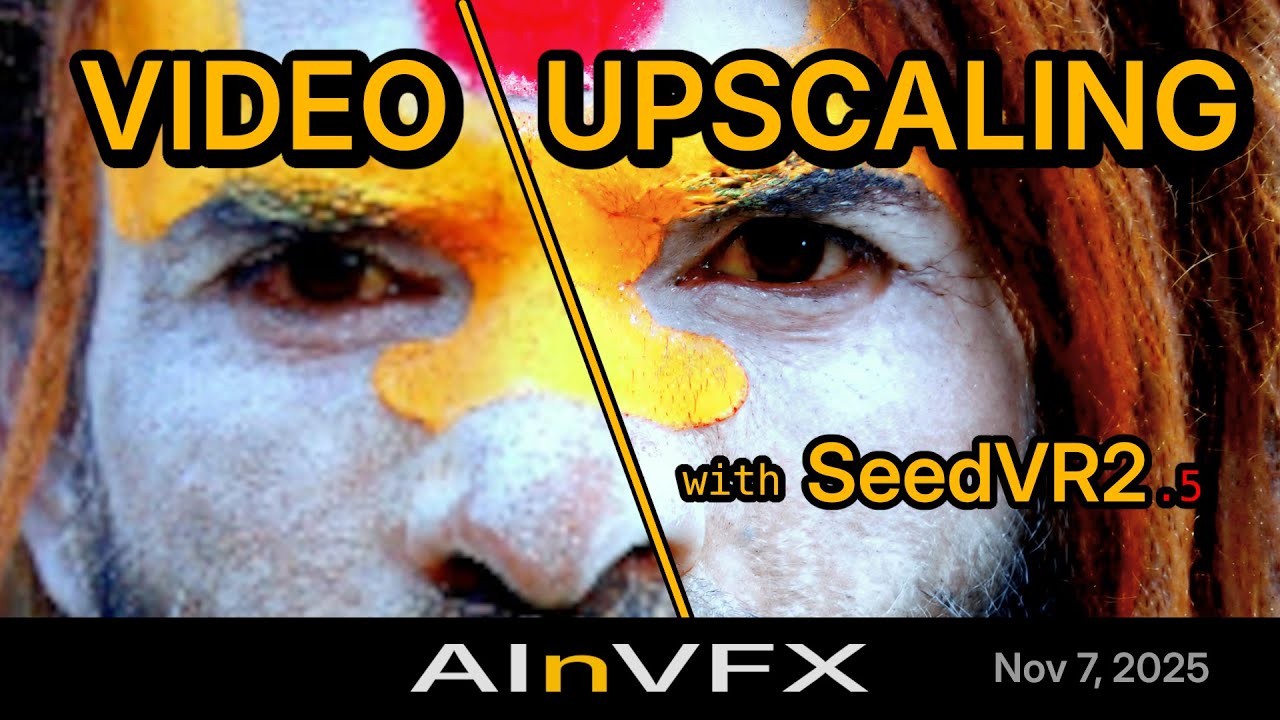
In the evolving landscape of AI-driven media enhancement, SeedVR2 stands out as a powerful tool for video restoration and upscaling. The latest version, 2.5, released in November 2025, marks a significant advancement in integrating this diffusion-based model with ComfyUI, a popular workflow platform for generative AI tasks. Developed through collaborative efforts, including contributions from the AInVFX team, this update addresses previous limitations in speed, memory efficiency, and usability, making it accessible even on consumer-grade hardware. At its core, SeedVR2 employs a one-step diffusion-transformer architecture capable of handling videos of any resolution without relying on additional modules, focusing on adversarial training against real data to produce high-fidelity outputs.
This release introduces a modular node system within ComfyUI, allowing users to fine-tune aspects like model selection, VAE handling, and compilation settings independently. Improvements span from enhanced memory management to support for advanced quantizations, enabling operations on GPUs with as little as 16GB VRAM. The integration now supports RGBA channels for transparent elements, streams long videos without VRAM spikes, and offers flexible resolution handling through lossless padding. Performance boosts come via torch.compile integration, which can accelerate processing by 20-40% for large batches, alongside optimized tensor operations that eliminate unnecessary conversions.
Beyond technical upgrades, version 2.5 emphasizes practical workflows, including templates for quick starts and a command-line interface for batch processing. While it requires recreating existing workflows due to breaking changes, the enhancements promise smoother operations for professionals in video production and AI enthusiasts alike. This guide explores the installation, features, and optimization strategies, drawing on the official documentation to provide a comprehensive overview of how SeedVR2 v2.5 transforms video upscaling into a more efficient and versatile process.
 Installation and Setup
The process of integrating SeedVR2 v2.5 into ComfyUI begins with a straightforward installation that leverages the platform’s custom node manager. Users can search for “SeedVR2” within the manager, selecting the version from AInVFX, which boasts the highest star count on GitHub. This ensures access to the latest release, typically version 2.5 or higher, complete with automatic model downloads for the diffusion transformer (DiT) and variational autoencoder (VAE) components. Upon installation, restarting ComfyUI is essential, and monitoring the console for errors helps confirm compatibility, particularly with optional packages like Triton for speed enhancements.
For environments lacking flash attention or facing out-of-memory issues with the VAE, workarounds are built-in, allowing seamless operation without these dependencies. In cases where the node menu does not appear post-installation, a manual approach is recommended: cloning the official GitHub repository into ComfyUI’s custom_nodes directory and installing requirements via pip. This method provides exhaustive documentation, including steps to resolve dependency conflicts by uninstalling conflicting nodes or setting up a fresh ComfyUI instance. Users are encouraged to report issues on the repository, pasting console logs for community assistance.
Once set up, SeedVR2 detects and utilizes available optimizations, such as Triton for torch.compile, though flash attention remains optional for further inference acceleration. Models are fetched from Hugging Face repositories associated with numz, AInVFX, and cmeka, placed in a dedicated SeedVR2 subdirectory under ComfyUI’s models folder. Custom paths can be configured via the extra_model_paths.yaml file, enabling users to point to pre-downloaded assets and avoid redundant fetches. This flexibility is particularly useful for offline workflows or managing large model files, ensuring the system validates integrity and resumes interrupted downloads automatically.
- Spec: Python 3.12.3 environment; compatible with ComfyUI V3;
- Features:
- Automatic model downloading and verification.
- Optional dependencies for performance (Triton, flash-attn).
- Custom path configuration for model storage.
 : Easy integration via manager; robust error handling and resume features.
 : Potential conflicts with other custom nodes; requires manual intervention for some setups.
 Model Variants and Selection
SeedVR2 v2.5 offers a range of model variants tailored to different hardware capabilities and quality needs, centered around two primary architectures: a 3 billion parameter model and a more detailed 7 billion parameter version. The 3B model, with 36 transformer blocks, strikes a balance between efficiency and output fidelity, making it suitable for entry-level GPUs. In contrast, the 7B model, featuring 66 blocks, excels in capturing intricate details, especially in its “sharp” variant, which emphasizes edge definition and texture preservation over the standard configuration.
Quantization options further customize these models: FP16 provides high precision at the cost of higher memory usage, while FP8 variants reduce footprint for faster inference, though they may introduce minor artifacts. Newly supported GGUF quantization allows 4-bit or 8-bit operations, ideal for low-VRAM systems, with fixes for previous leaks and compatibility with torch.compile. Selection depends on the task—single images benefit from the 7B sharp FP16 for maximum detail, whereas video batches favor FP8 to maintain speed without excessive memory demands.
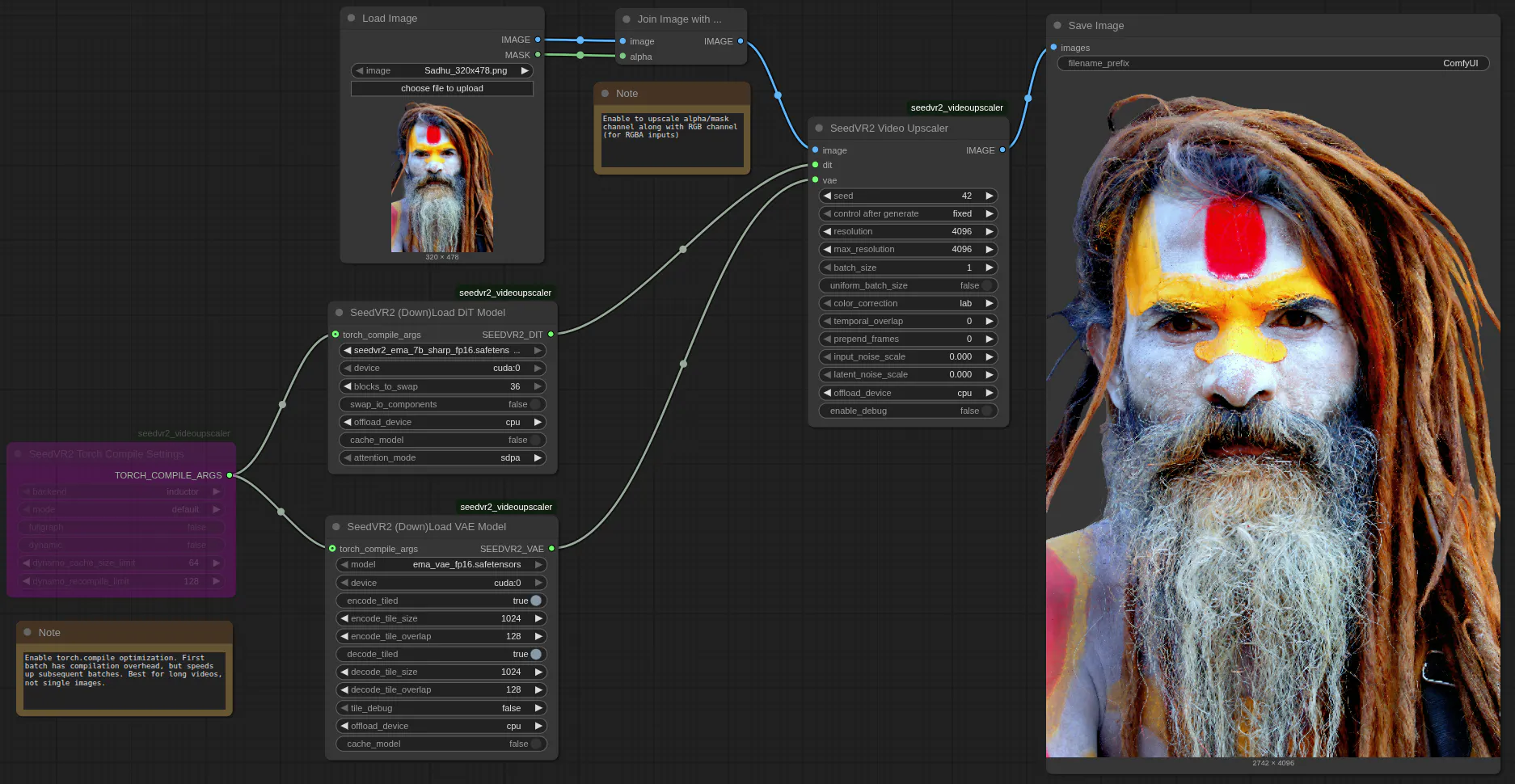
The modular node design separates DiT loading from VAE handling, permitting independent configurations like block swapping for the DiT to offload unused components to CPU, thus enabling larger models on modest hardware. Users can cache models on GPU for repeated runs, reducing load times significantly, and the system automatically updates settings without reloading from disk. This approach not only streamlines workflows but also encourages experimentation, as switching between variants reveals trade-offs in sharpness versus processing time.
| Model Variant | Parameters | Quantization Options | Key Features | Weaknesses |
|---|---|---|---|---|
| 3B Standard | 3 Billion | FP16, FP8, GGUF (4/8-bit) | Efficient for videos; lower VRAM (~18GB min); good temporal consistency | Less detail in complex scenes; potential artifacts in FP8 |
| 7B Standard | 7 Billion | FP16, FP8, GGUF (4/8-bit) | High fidelity; versatile for images/videos; supports sharp variant | High VRAM demand (up to 24GB+); slower on consumer GPUs |
| 7B Sharp | 7 Billion | FP16, FP8 | Enhanced edge and texture sharpness; ideal for detailed upscaling | Increased processing time; higher risk of OOM without optimizations |
- Spec: DiT models from 3B to 7B; VAE fixed with tiling support.
- Features:
- Block-based architecture for swapping.
- Automatic dtype maintenance (bfloat16).
- : Versatile options for hardware; sharp variant boosts quality.
- : FP8 may compromise precision; GGUF limited to lower bits.
 Key Features and Enhancements
Version 2.5 restructures SeedVR2 into a four-node system within ComfyUI, comprising the main upscaler, DiT loader, VAE loader, and torch.compile configurator, fostering granular control over the upscaling pipeline. This modularity allows users to adjust parameters independently, such as enabling VAE tiling to process high resolutions in segments, reducing memory overhead while preserving quality through overlap blending. The integration now natively handles RGBA inputs, upscaling alpha channels with edge guidance to maintain transparency in composited elements, a boon for visual effects workflows.
Streaming architecture represents a core enhancement, processing long videos batch by batch without accumulating VRAM, as intermediate tensors are offloaded to CPU RAM progressively. This ensures consistent memory usage regardless of footage length, complemented by flexible resolution support that employs lossless padding instead of cropping, accommodating diverse aspect ratios. Additional parameters like uniform_batch_size enforce consistent processing across frames, while temporal_overlap and prepend_frames improve continuity in video outputs, mitigating artifacts at batch boundaries.
The update also introduces global model caching, where DiT and VAE instances are shared across multiple upscaler nodes, automatically updating configurations without redundant loads. This facilitates complex workflows, such as parallel upscaling at different resolutions, enhancing efficiency in production environments. Overall, these features transform SeedVR2 from a resource-intensive tool into a more adaptable solution, bridging the gap between high-end capabilities and everyday hardware.
- Features:
- Modular nodes for flexibility.
- RGBA and streaming support.
- Advanced parameters for batch control.
- : Reduces rework; improves video stability.
- : Breaking changes require workflow rebuilds.
 Optimization Techniques
Optimizing SeedVR2 v2.5 involves a layered approach to balancing speed, quality, and resource use, starting with batch sizing. A minimum of five frames per batch ensures temporal consistency through overlap blending, with higher values yielding smoother videos but demanding more VRAM. For inference acceleration, torch.compile integrates seamlessly, compiling the full graph for 20-40% faster DiT operations and 15-25% VAE speedup, though it’s most effective for extended videos where initial compile overhead is amortized over multiple batches.
Block swapping emerges as a pivotal technique for memory-constrained setups, dividing the model’s transformer blocks—36 for 3B, 66 for 7B—into swappable units offloaded to CPU during upscaling. Enabling this with non-blocking transfers minimizes latency, while caching models on GPU eliminates repeated loads in iterative workflows. Users can further refine by offloading I/O components separately, clearing memory adaptively at 5% thresholds to prevent leaks.
Tiling extends this to the VAE, segmenting encoding and decoding into manageable tiles with configurable overlap for seamless merging. Combined with native PyTorch operations replacing einops for 2-5x faster transforms, these methods allow upscaling on 16GB GPUs that previously failed. Debugging modes provide per-phase VRAM tracking, guiding adjustments like disabling offloads for pure GPU runs to shave seconds off small tasks. In practice, these optimizations enable users to push hardware limits, turning potential bottlenecks into tunable parameters for tailored performance.
- Features:
- Torch.compile modes: fullgraph, reduce-overhead.
- Adaptive block swapping.
- Tiling with overlap.
- : Significant speed gains; hardware-agnostic.
- : Compile overhead for short clips.
 Memory Management Strategies
Effective memory management in SeedVR2 v2.5 centers on a four-phase pipeline—encoding, upscaling, decoding, post-processing—executed sequentially across batches to minimize model swaps. Independent offload devices for DiT, VAE, and tensors allow precise control: setting to CPU unloads completed components, freeing VRAM for subsequent phases without performance hits in long sequences. This prevents accumulation, maintaining peak usage at around 11-12GB for batched videos, irrespective of length.
The Conv3d workaround addresses PyTorch bugs, reducing usage by up to 3x in cuDNN operations, while GGUF support enables low-bit inference on sub-24GB cards. For videos, streaming saves progressive outputs, avoiding end-stage spikes, though sufficient system RAM is needed for the final assembly. Debug logging reveals phase-specific peaks, such as 5GB for encoding on a 16GB GPU, guiding users to adjust batch sizes or enable block swapping when upscaling exceeds limits.
In multi-node setups, shared caching ensures models remain resident on the chosen device, updating dynamically for changes like resolution shifts. This strategy not only averts out-of-memory errors but also sustains efficiency in batch processing, where varying inputs could otherwise inflate demands. By prioritizing offloads and cleanups, SeedVR2 accommodates diverse hardware, from consumer RTX cards to high-end H100s, democratizing advanced upscaling.
- Features:
- Peak VRAM tracking per phase.
- Independent offloads.
- Streaming for long videos.
- : Consistent usage; leak fixes.
- : Requires RAM for large outputs.
 Performance Enhancements
Performance in SeedVR2 v2.5 has seen substantial uplifts through targeted optimizations, beginning with the removal of flash attention dependency in favor of SDPA fallback, ensuring 10% faster inference where installed. Torch.compile’s graph optimization shines in upscaling stages, cutting times from 282 seconds to 182 seconds per batch in tests, with cumulative savings amplifying for hour-long footage. Native dtype pipelines preserve bfloat16 precision end-to-end, eliminating conversions that previously slowed transforms.
Benchmarks illustrate these gains: on an RTX 4090, 5-frame batches at 1080p complete in under 15 seconds with FP8 models, scaling to 0.34 FPS. Larger setups like H100 achieve 0.63 FPS for 15 frames, with multi-GPU distribution blending overlaps for seamless parallelism. Overhead reductions in block swapping, via asynchronous transfers, further streamline operations, dropping total times by up to 4x compared to prior versions.
These enhancements extend to CLI batch processing, where model caching accelerates directory-wide upscales, handling mixed images and videos efficiently. By focusing on phase-specific resources and deterministic seeding for reproducibility, the system delivers reliable speed without quality trade-offs, positioning it as a robust tool for production-scale tasks.
- Features:
- Multi-GPU blending.
- Up to 40% DiT speedup.
- Deterministic generation.
- : Scalable for large datasets; consistent benchmarks.
- : Dependent on batch size for max efficiency.
 Quality Upgrades
Quality advancements in SeedVR2 v2.5 emphasize perceptual accuracy, with LAB color correction as the default method for superior transfer from inputs, outperforming HSV or wavelet alternatives in maintaining vibrancy. Hybrid approaches blend these for nuanced results, while Hann window blending ensures temporal smoothness, reducing flickers in video transitions. Deterministic seeding locks variations, allowing reproducible outputs across runs.
The sharp 7B variant elevates detail rendition, particularly in textures and edges, benefiting from adversarial training roots. RGBA support refines transparency upscaling, guiding edges to avoid halos, ideal for VFX. Post-processing unifies batches with color matching, preserving intent even in diverse resolutions.
These upgrades foster a narrative of refinement, where outputs not only scale but enhance realism, drawing on optimized operations for artifact-free results. Users report cleaner details in complex scenes, underscoring the model’s evolution toward professional-grade restoration.
- Features:
- Multiple color methods.
- Temporal blending.
- : High fidelity; transparency handling.
- : Work-in-progress alpha.
 Command Line Interface Usage
The CLI in SeedVR2 v2.5 extends ComfyUI’s capabilities for batch-oriented tasks, invoking via Python from the custom_nodes directory to process folders of images and videos. Parameters mirror the UI, including batch_size for consistency and max_resolution to constrain outputs, preventing OOM in mixed inputs. Multi-GPU support distributes workloads with temporal blending, ideal for high-volume upscaling.
Examples include simple image commands or directory processing with caching enabled for speed. Outputs auto-detect formats, saving MP4 for videos and PNG for images, with progress tracking enhancing UX. This tool complements graphical workflows, offering scriptable efficiency for automation.
- Features:
- Batch directory support.
- Unified parameters with UI.
- Auto-format detection.
- : Efficient for bulk; multi-GPU.
- : Less intuitive for beginners.
SeedVR2 v2.5 emerges as a pivotal update in AI video upscaling, blending accessibility with advanced features to cater to diverse users. Key takeaways include its modular design for customization, robust memory strategies for broader hardware compatibility, and performance boosts that streamline workflows. Balanced recommendations favor the 3B FP8 for efficiency-driven tasks and 7B sharp FP16 for quality-focused projects, always starting with templates to mitigate breaking changes.
Reflecting on broader implications, this release signals a shift toward democratized AI tools in media production, potentially accelerating innovations in content creation while highlighting the need for ongoing optimizations in resource management. As diffusion models evolve, SeedVR2’s trajectory suggests a future where high-fidelity restoration becomes standard, fostering creativity across industries.