はじめに
みなさんは、スマホで撮った旅行写真を「もっと綺麗にしたい」「背景を変えたい」「この服に着替えたバージョンを試したい」と思ったことはありませんか? 従来の画像編集アプリでは、Photoshopのような専門ソフトを使ったり、細かい操作を繰り返したりと、時間と手間がかかりました。しかし、2026年2月に登場した新しいAIツール「FireRed-Image-Edit」が、そんな常識を覆します。
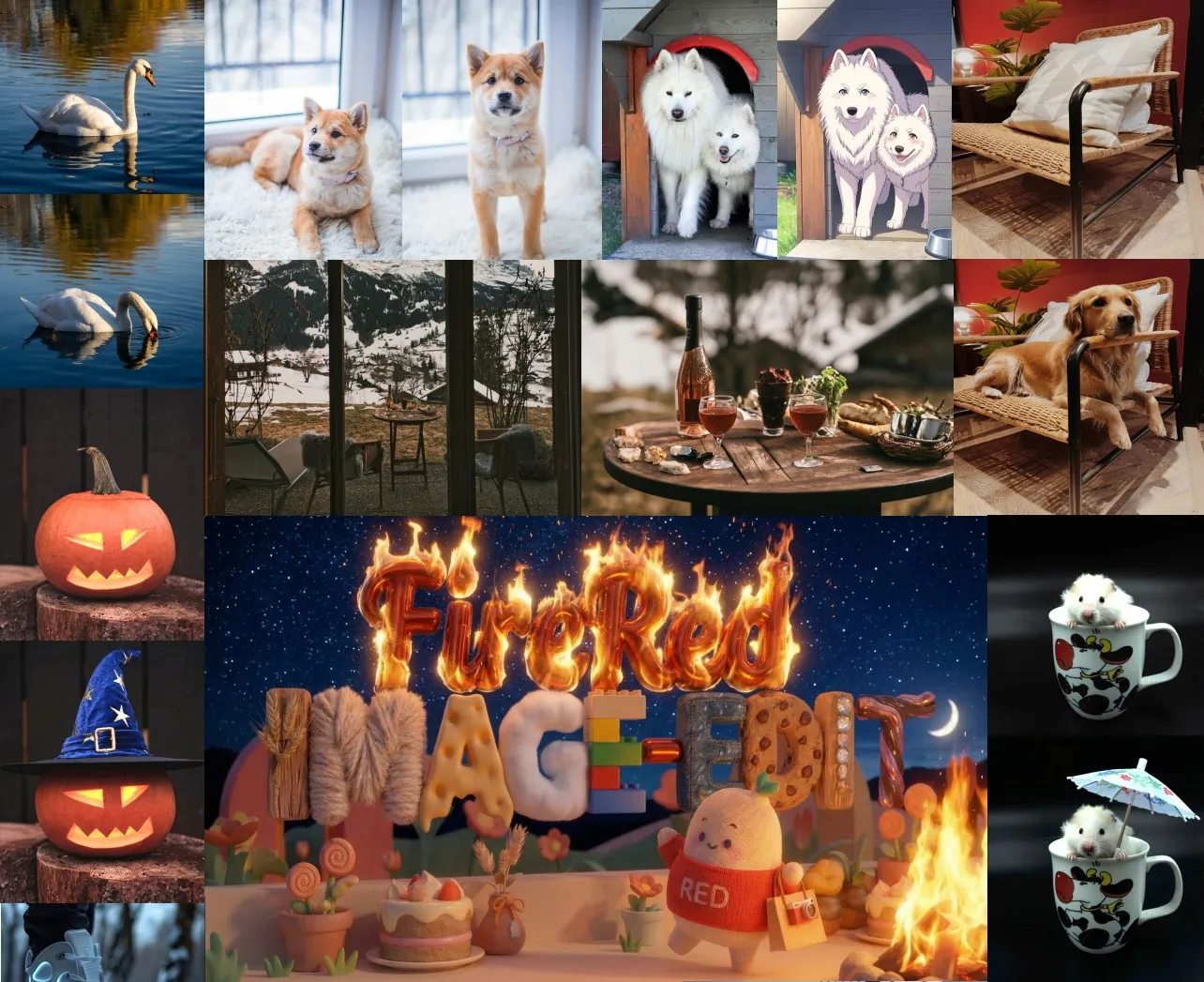
このモデルは、シンプルな中国語や英語の文章(例:「背景をビーチに変えて」「文字を『2026夏セール』に変更して」)を入力するだけで、プロ並みの自然で高品質な編集を瞬時に行ってくれます。しかもオープンソースで無料公開されており、誰でも試せます。開発元は中国の人気SNS「小紅書(Xiaohongshu)」のスーパーインテリジェンスチーム「FireRedTeam」。同社は日常のファッションやライフスタイル写真を美しく共有するプラットフォームとして知られていますが、今回その技術力を活かして、画像編集の民主化に挑みました。
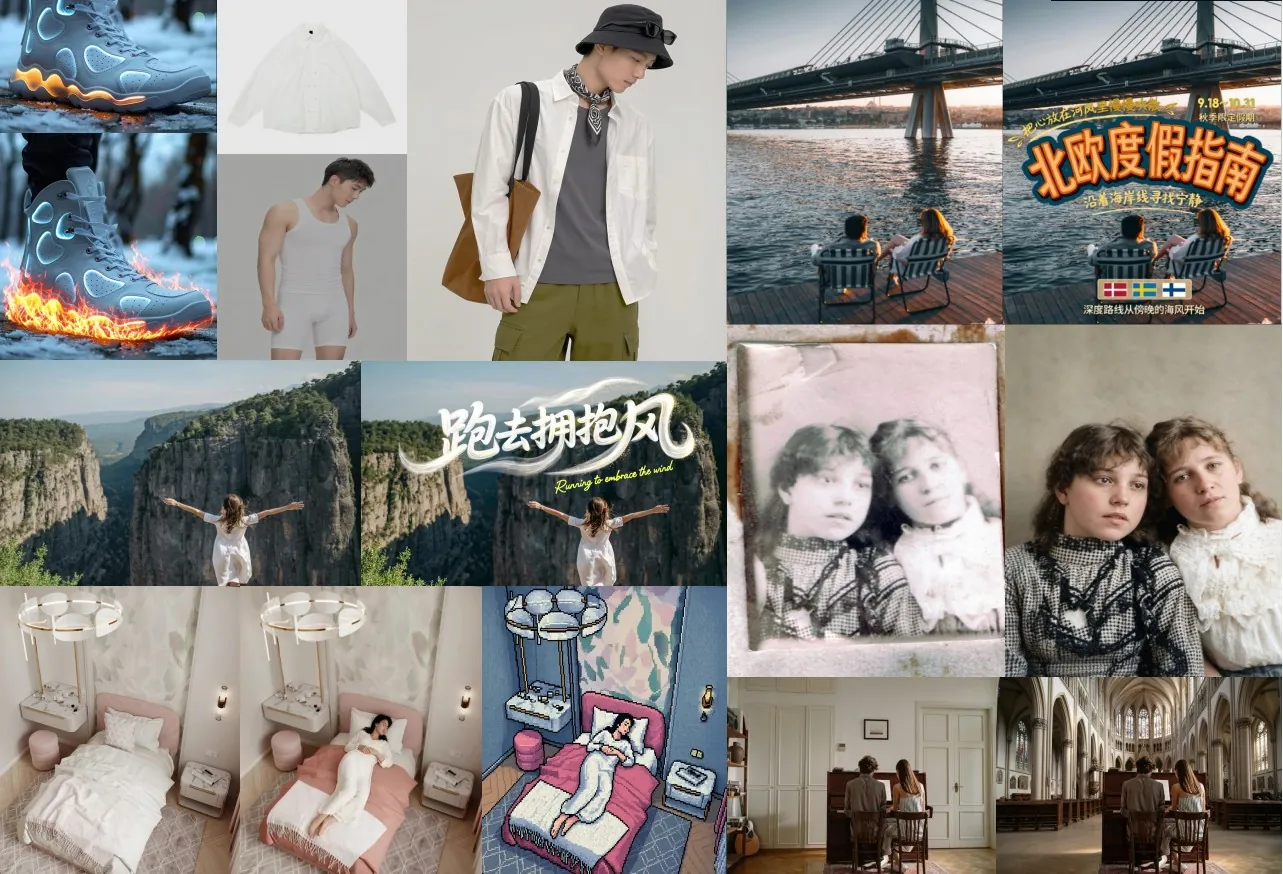
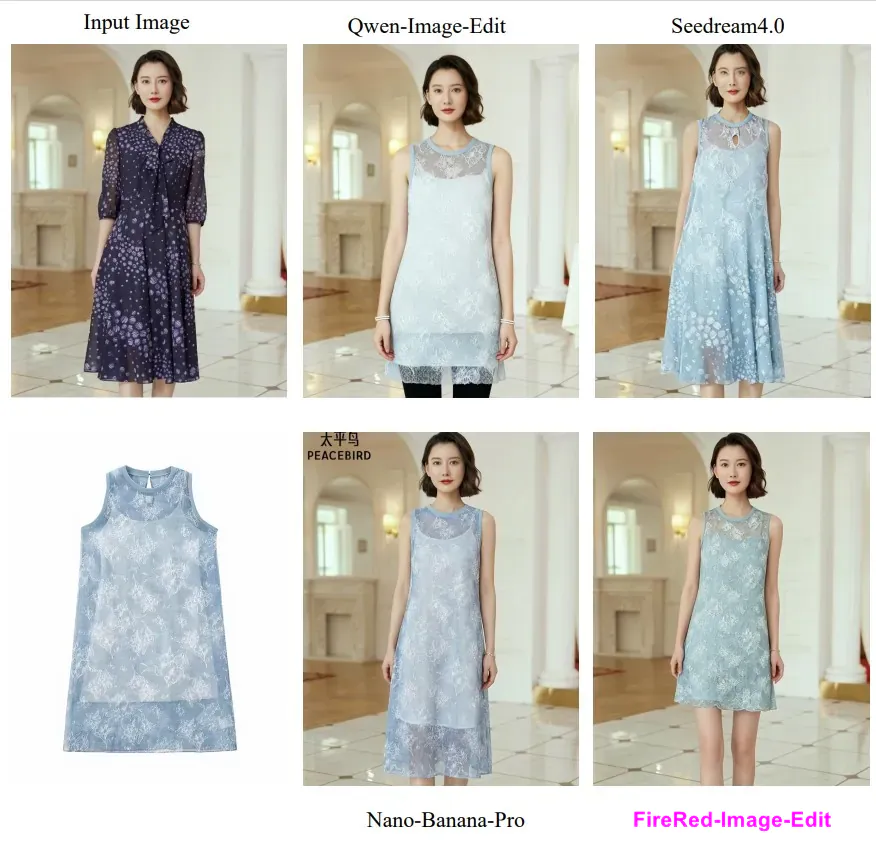
FireRed-Image-Editの最大の強みは「指示通りに正確に編集しつつ、元の画像の雰囲気や人物の顔をしっかり保つ」点です。従来のAI編集ツールでは、指示を無視したり、顔が不自然になったり、背景が崩れたりする問題がよくありましたが、このモデルはそうした弱点を大幅に克服。テキスト(看板やポスターの文字)編集も抜群に上手で、フォントやスタイルを崩さずに変更できます。また、古い写真の修復や肌の美肌加工、服の仮想試着など、日常生活に直結するタスクに特に強いのが魅力です。
技術的には、1.6億件もの膨大な学習データを使い、多段階の学習を重ねて育てられました。単に「画像を生成する」だけでなく、「指示に基づいて既存の画像を賢く変更する」能力を徹底的に磨いています。ベンチマークテストでは、オープンソースモデルはもちろん、一部の有料商用AIをも上回る結果を記録。GitHubとHugging Faceでモデルが公開され、オンラインで即デモ体験も可能です。
この記事では、一般の皆さんが興味を持ちやすいよう、難しい数式や専門用語は最小限に。FireRed-Image-Editがどんな技術で実現されているのか、実際の活用シーン、競合モデルとの違い、そしてこれからのAI画像編集が私たちの生活をどう変えるのかを、わかりやすく深掘りします。スマホ1台でプロ級のクリエイティブが手に入る時代が、すぐそこまで来ています。
 AI画像編集の歴史とFireRed-Image-Editの登場
画像編集AIの歴史は、2010年代後半の生成AIブームから本格化しました。最初は「テキストから新しい画像を作る」テキストtoイメージ(T2I)が主流で、Stable DiffusionやMidjourneyが人気を博しました。しかし、ユーザーの多くが欲しかったのは「既存の自分の写真を自然に編集したい」というニーズでした。そこで登場したのが「instruction-based image editing」、つまり「文章指示で画像を編集する」技術です。
従来のツールでは、編集結果が「指示と微妙にズレる」「元の写真の人物が別人みたいになる」「全体の照明や質感が崩れる」といった問題が目立ちました。特に日本語対応が弱かったり、細かいニュアンス(「少し明るく」「自然な笑顔に」)を理解しにくかったりする点が課題でした。
FireRed-Image-Editは、ここに革命を起こします。開発チームは、まず「本当に役立つデータ」を徹底的に集めました。総数16億件の画像ペア(テキストから画像を作るデータ9億件+編集データ7億件)を集め、丁寧にクリーニング。最終的に1億件以上の超高品質データに絞り込みました。これにより、AIは「自然な写真の編集」を深く学習。たとえば「この犬を柴犬に変えて」といった指示でも、毛並みや表情をリアルに再現します。
さらに、学習プロセスを3段階に分けました。最初に基本的な画像生成力を固め、次に編集の練習をたっぷり行い、最後に人間の好みに近い結果を選び出す「報酬学習」を加えています。これで「指示を守りつつ、美しく自然に」仕上げる力が飛躍的に向上。2026年2月14日にモデルが公開されると、SNSでは「顔の表情が変わらない!」「文字が完璧に修正できる!」と驚きの声が相次ぎました。日本でも、旅行好きや美容好きの間で話題沸騰中です。
このモデルは「誰でも使える」ことを徹底的に意識。専門知識ゼロで、日常会話のような指示でOK。たとえば家族写真を「みんなを笑顔に、背景を桜の木の下に」と指定すれば、数秒で理想の1枚が完成します。まさに、AIが「あなたのクリエイティブパートナー」になる瞬間です。
 データの力:誰もが納得の高品質学習データ
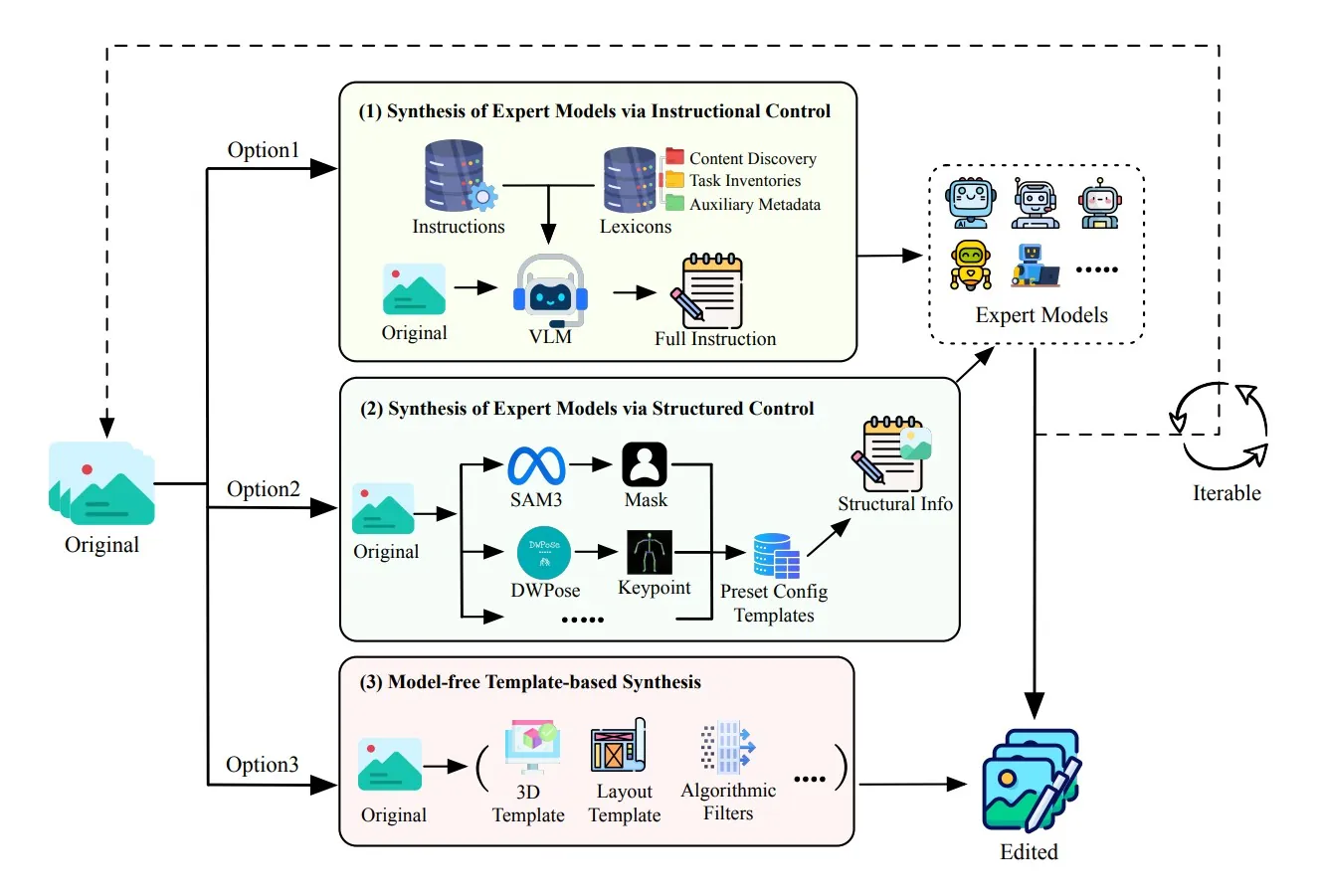
優れたAIは「優れたデータ」で育つもの。FireRed-Image-Editの強さの秘密は、ここにあります。チームは世界中のオープンソースデータセット、動画、インターネット画像を活用しつつ、自社で「データ生産エンジン」を構築。単に集めるだけでなく、以下の工夫を凝らしました。
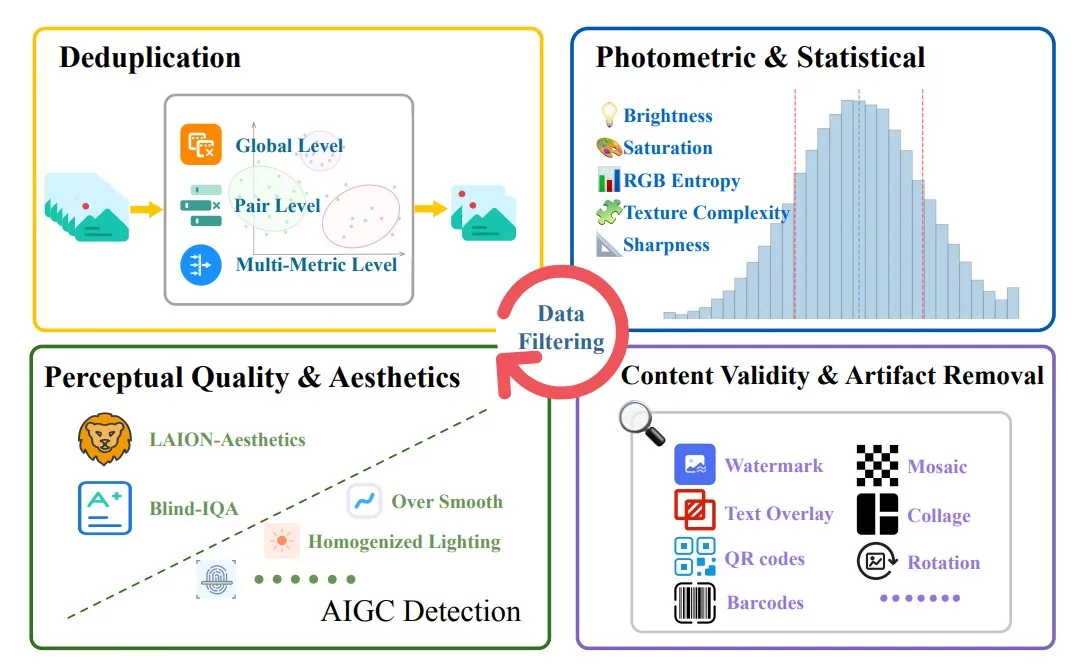
まず、重複や低品質画像を徹底排除。明るさや鮮明度が悪いもの、AI生成っぽい不自然な画像、水印やモザイクが入ったものを自動でフィルタリング。次に、VLM(画像を理解するAI)を使って、画像の内容を詳細に記述した「構造化キャプション」を作成。これでAIは「この画像に何が写っているか」を深く理解します。
さらに、編集指示も3段階で洗練。「詳細版(何が変わったか細かく)」「簡潔版(要点だけ)」「日常会話版(『これ直して!』みたいな自然な言い回し)」を混ぜて学習。こうして、曖昧な指示でも正確に動けるようになりました。
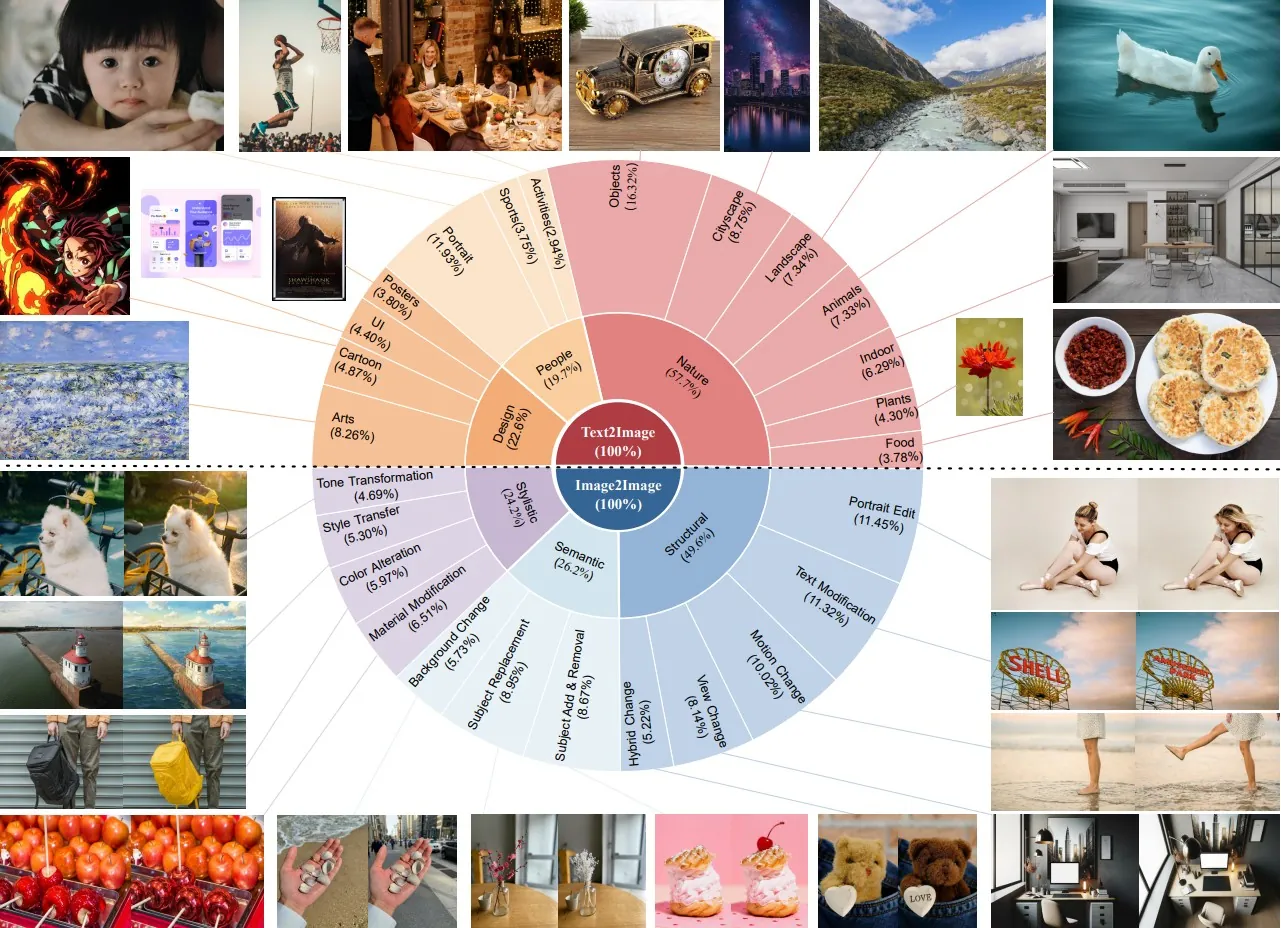
データはバランスよく分類されています。自然風景・人物・デザインなどの「テキストから画像生成」データと、内容変更・スタイル変更・構成変更などの「編集」データを半々。長尾(珍しいケース)対策として、不足分野は自動で追加生成する仕組みも導入。これにより、AIは「ありふれた編集」だけでなく、「古写真の修復」「看板文字の修正」「服の試着」といった実用的タスクも得意になりました。
一般ユーザー目線で言うと、このデータのおかげで「自分の写真が不自然にならない」安心感が生まれます。たとえば、子供の運動会写真を「背景をスタジアムに変えて」しても、子供の表情やポーズが崩れません。こうした「アイデンティティ保存」の力が、FireRed-Image-Editを「日常使いできるAI」に押し上げています。
 賢い学習テクニック:効率よくプロの技を習得
「大量データがあればいい」というわけではありません。FireRed-Image-Editは、学習の効率化にもこだわりました。開発チームが導入した工夫を、簡単に解説します。
1つ目は「バケットサンプラー」。画像の縦横比や枚数が違う場合に、無駄な空白を減らして効率的に学習させる仕組みです。これでGPUの無駄が少なくなり、学習が速く安定します。
2つ目は「指示のシャッフル」。複数の参考画像を使う場合、順番をランダムに入れ替え、テキストもそれに合わせて自動修正。AIが「位置に頼らず内容を正しく理解する」力を養います。
3つ目は「一貫性ロス」と呼ばれる技。編集前後の画像の大事な部分(顔や物体)を比較して「似ている度合い」を数値化し、学習に反映。これで「顔が別人になる」トラブルを激減させました。
テキスト編集では特に工夫が光ります。OCR(文字認識)技術を活用した報酬システムで、文字のフォントや位置を正確に保ちつつ変更可能に。美肌加工や低レベル強調(シャープネス向上)も、新しく追加されたベンチマークで鍛えられています。
これらのテクニックは、すべて「一般ユーザーがストレスなく使える」ために考えられたもの。結果、商用AIに匹敵する品質を、オープンソースで実現。しかもモデルサイズは実用的で、個人PCやクラウドで動かせます。非技術者でも「AIが賢くなったな」と実感できる仕上がりです。
 性能比較:FireRedは本当に優れているのか?
実際にどれくらい強いのか、他のモデルと比べてみましょう。開発チームが作成した「REDEdit-Bench」(15種類の編集タスクを網羅した新ベンチマーク)や、公開ベンチマークでの結果を表にまとめました。
| モデル | Imgeditスコア | Geditスコア | RedEditスコア | オープンソース | 得意分野例 | 弱点例 |
|---|---|---|---|---|---|---|
| FireRed-Image-Edit | 4.56 | 7.92 | 4.29 | はい | 文字編集・試着・修復 | 極端なスタイル変更時 |
| FLUX.2 | 4.35 | 7.35 | 4.05 | はい | 一般生成 | 細かい指示遵守 |
| Qwen-Image-Edit | 4.51 | 7.85 | 4.00 | はい | 高速処理 | 一貫性に時々ムラ |
| Nano Banana Pro | 4.37 | 7.85 | 4.48 | いいえ | 高精細生成 | コスト高・非公開 |
| Seedream 4.0 | 4.30 | 7.70 | 4.15 | いいえ | クリエイティブ | 人物の自然さ |
(注:スコアは人間評価の総合値。高いほど優れている。RedEditは開発チームの新ベンチマーク)
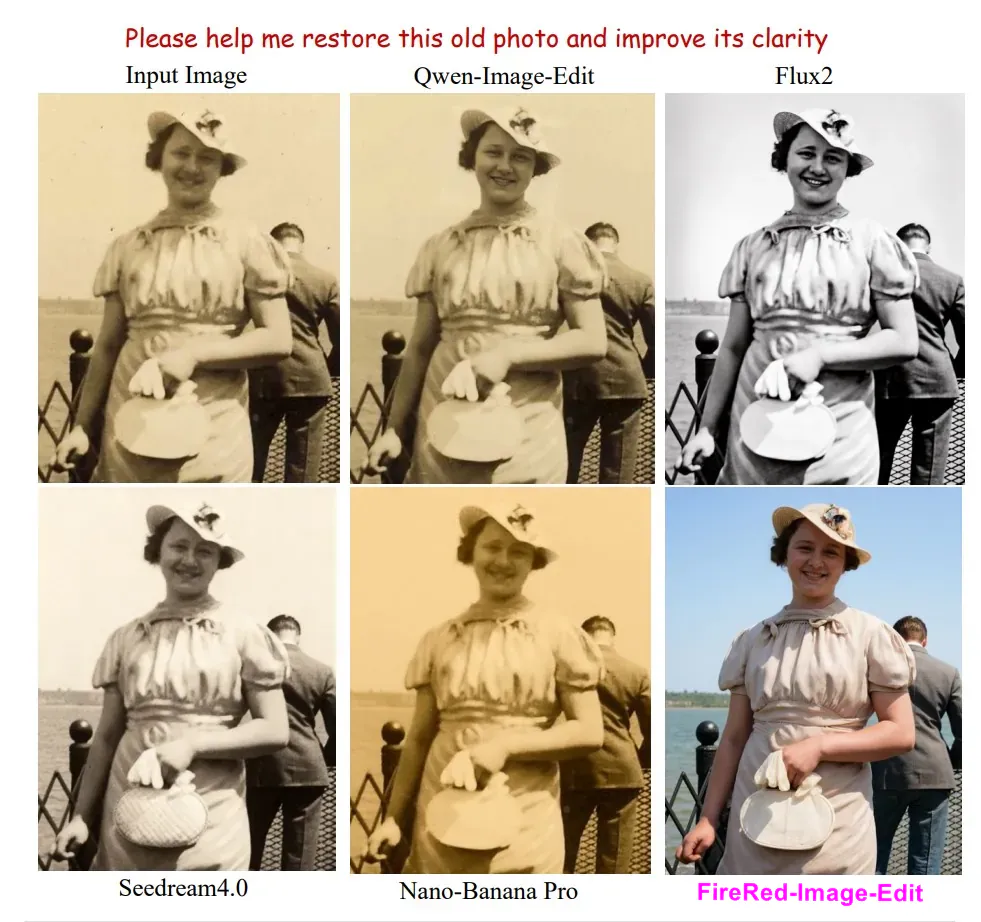
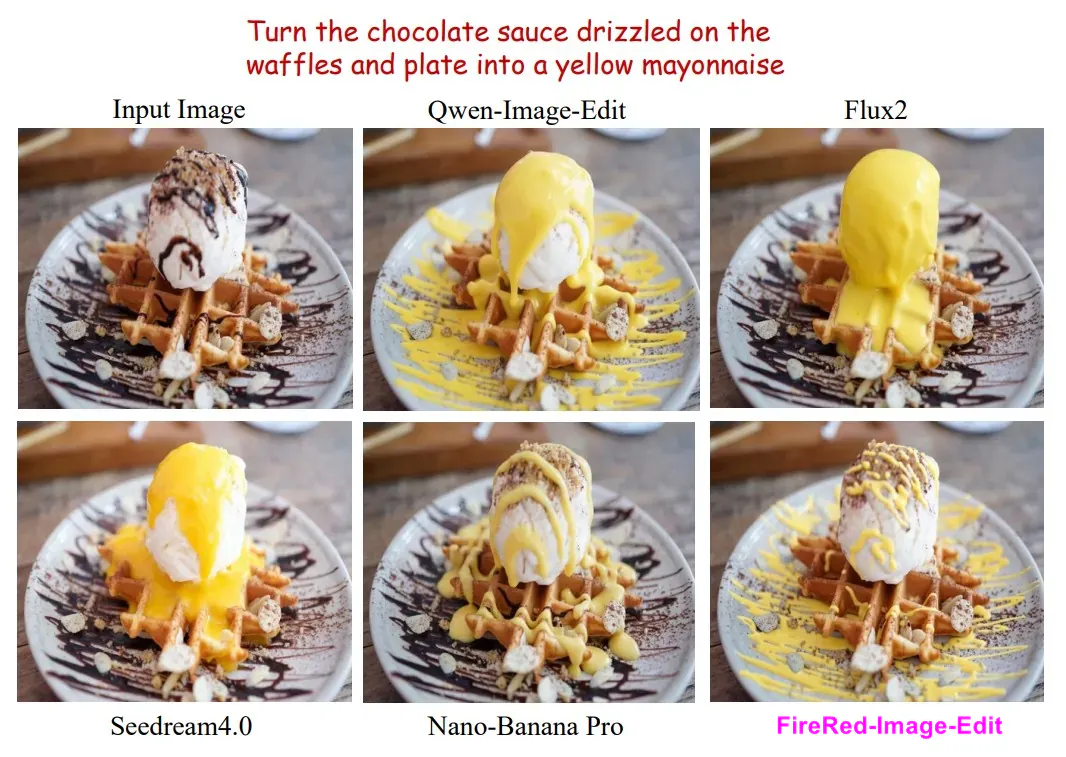
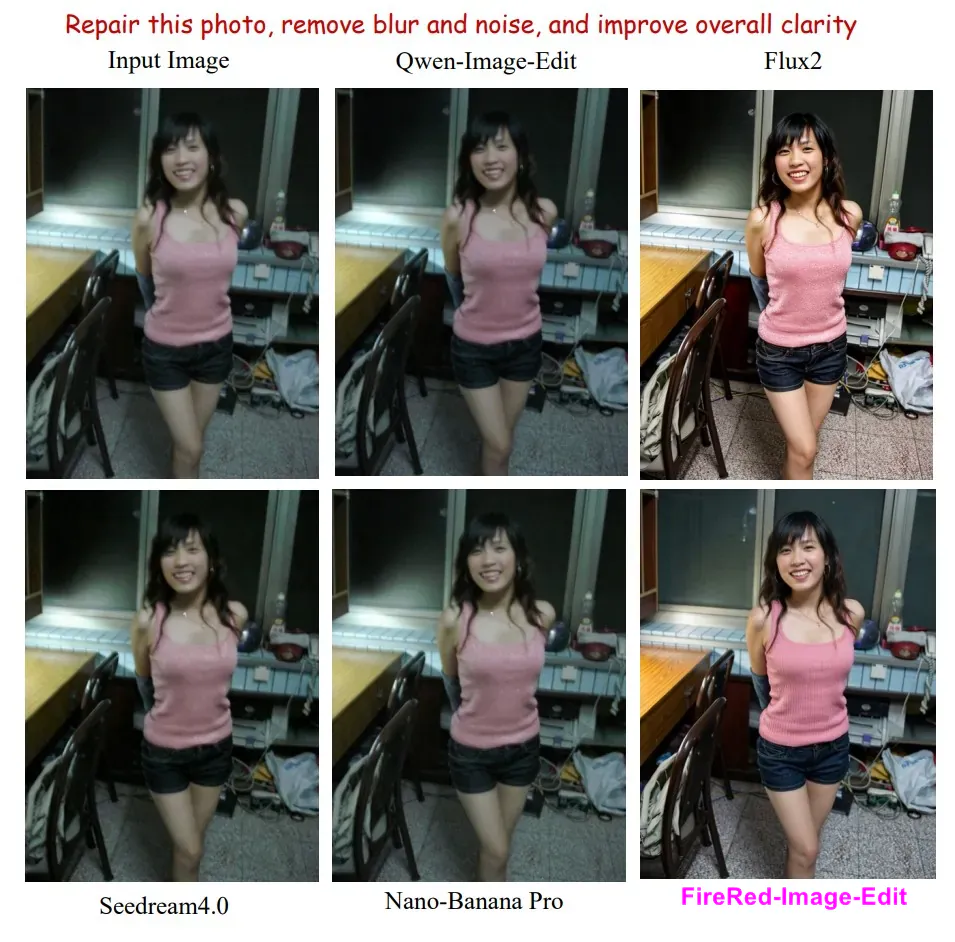
表からわかるように、FireRedはオープンソースながら閉鎖型モデルを上回る場面が多く、特に「RedEdit」ではトップクラス。文字編集や仮想試着、写真修復で特に評価が高いです。QwenやFLUX.2と比べても、編集の自然さと指示遵守で勝っています。
日本ユーザー視点では、「小紅書風の綺麗なライフスタイル写真編集」にぴったり。商用ツールより自由度が高く、プライバシーを守りやすいのも魅力です。ただし、極端な芸術的変更ではまだ改善の余地あり。将来的にさらに進化が期待されます。
 実際の活用シーン:あなたの日常がもっと楽しくなる
FireRed-Image-Editの真価は、日常での実用性にあります。
家族・思い出写真編
古いアルバムの黄ばんだ写真をアップロードして「自然な色に戻して、笑顔を強調して」と指示。数秒で鮮やかによみがえります。結婚式の集合写真で「背景を海外リゾートに変えて」も、みんなの表情がそのまま残るので違和感ゼロ。
ファッション・美容編
小紅書ユーザー必見。自分の写真に「この服を赤いワンピースに変えて、髪をロングに」と入力すれば、仮想試着完了。肌を「自然な美肌に」加工したり、背景をスタジオ風にしたりも簡単。Instagram投稿用の完璧な1枚が作れます。
旅行・クリエイティブ編
「このカフェ写真のテーブルにケーキを追加して」「看板の文字を日本語に変えて」と指示。ポスター作成やSNS用画像がプロ級に。複数画像を組み合わせる「コラージュ風編集」も得意です。
ビジネス・教育編
商品写真の背景を統一したり、教科書のイラストを「もっと可愛く」に修正したり。デザイナーでなくても、短時間でクオリティの高いビジュアルが作れます。
実際のデモ(Hugging Faceのオンライン版)では、こうした例が多数公開されており、初心者でもすぐに感動できます。注意点は、著作権のある画像や個人情報に配慮することくらい。安全に楽しめます。
 将来展望:AI画像編集が変える社会
FireRed-Image-Editの登場は、AI画像編集の「第2章」の始まりと言えるでしょう。今後は、さらに多様な言語対応(日本語の自然なニュアンス理解強化)、動画編集への拡張、モバイルアプリ化が進むはずです。小紅書のノウハウを活かせば、ファッションや美容分野でのパーソナライズド編集が爆発的に普及するでしょう。
社会的な影響も大きいです。誰もがクリエイターになれることで、SNSの表現が豊かになり、個人の思い出を美しく残せます。一方で、ディープフェイク対策や著作権問題は引き続き重要。開発チームがオープンソースにしたのは、「みんなで一緒に良くしていこう」というメッセージでもあります。
日本では、写真文化が根強いだけに、このツールは特に歓迎されるはず。家族アルバムのデジタル化、観光PR画像の作成、趣味のイラスト加工…可能性は無限大です。FireRed-Image-Editは、技術の民主化を体現する存在。あなたも今すぐGitHubやHugging Faceで試してみてください。きっと「こんなに簡単でいいの?」と驚くはずです。
AIは道具。どう使うかは私たち次第。FireRed-Image-Editがきっかけとなり、もっと多くの人が「自分のストーリーを美しい画像で語る」時代が来ることを願います。次のアップデートが待ち遠しい、そんな未来がもうすぐそこにあります。
(情報源:公式技術レポート、GitHub、Hugging Face公開情報に基づく。2026年2月時点の最新情報です)